# Signup for Businesses
We are required to collect and verify specific information for all business entities opening a Pro account to meet regulatory requirements. There are two main steps in the verification process:
{% stepper %}
{% step %}
### [**Account Creation**](#step-1-account-creation)
Choose the account username, password and verify the primary user's email.
{% endstep %}
{% step %}
### [Account Verification](#step-2-account-verification)
Answer a [questionnaire](#step-2.1-business-questionnaire) to confirm the business' [eligibility](https://help.rails.xyz/user-verification#what-are-the-eligibility-requirements-to-use-rails-pro) for the product, upload [business documents](https://help.rails.xyz/signing-up/user-verification/know-your-business-kyb/business-document-requirements) to complete [Know Your Business (KYB) ](https://help.rails.xyz/signing-up/user-verification/know-your-business-kyb)requirements, and have all [required individuals](https://help.rails.xyz/user-verification/know-your-business-kyb/kyc-requirements-for-businesses#required-individuals) complete [Know Your Customer (KYC) ](https://help.rails.xyz/signing-up/user-verification/know-your-customer-kyc)identity verification.
{% endstep %}
{% endstepper %}
{% hint style="success" %}
This should only take 5-10 minutes of your time if you have all required documentation and information ready up front. Our team will then complete our review of your business documents within one business day.
{% endhint %}
## Step 1: Account Creation
{% columns %}
{% column width="58.333333333333336%" %}
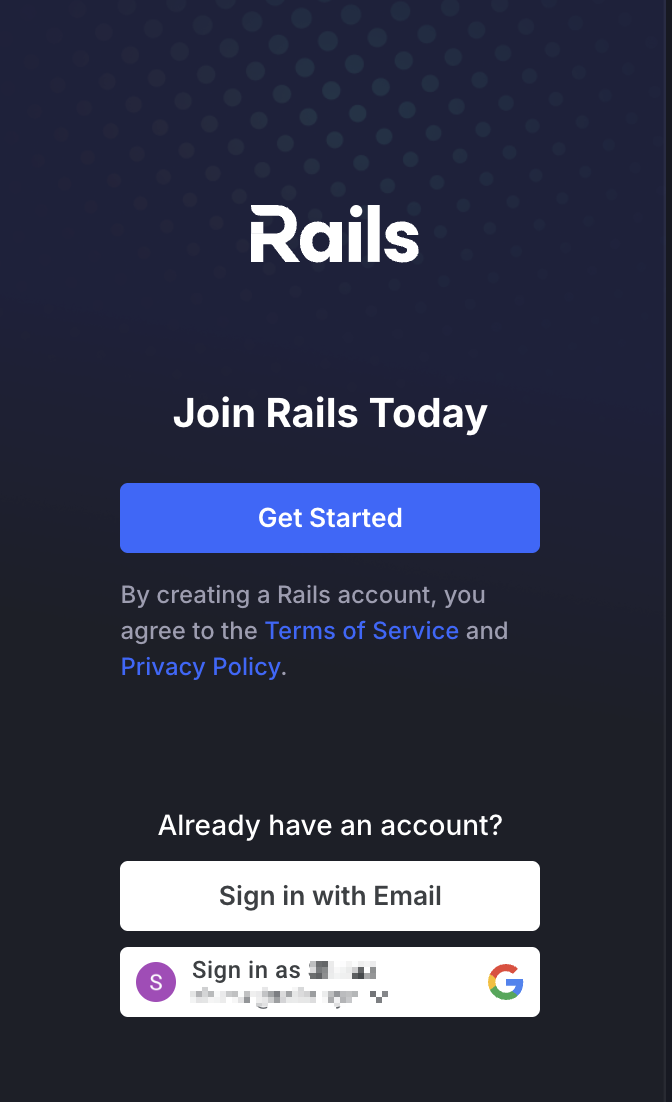
1. Go to the [Rails website](https://trade.rails.xyz/trade/BTC-USD) to create your account.
{% endcolumn %}
{% column width="41.666666666666664%" %}
{% endcolumn %}
{% endcolumns %}
{% columns %}
{% column %}
2\. Click **Get Started.**
{% endcolumn %}
{% column %}
{% endcolumn %}
{% endcolumns %}
{% columns %}
{% column %}
3\. Select **Business** as your Account Type, fill in the credentials and click **Next.**
{% endcolumn %}
{% column %}
{% endcolumn %}
{% endcolumns %}
{% columns %}
{% column %}
4\. Check your email for a verification link.
{% hint style="warning" %}
The verification link expires after 30 minutes. Click **Resend Link** for another opportunity to verify your account.
{% endhint %}
{% endcolumn %}
{% column %}
{% endcolumn %}
{% endcolumns %}
{% columns %}
{% column %}
5\. Click **Verify your email address** in the email you received.
{% endcolumn %}
{% column %}
{% endcolumn %}
{% endcolumns %}
{% columns %}
{% column %}
6\. Once you click the verification link in your email, you should be taken to the Rails login page confirming that your email is verified. Click **Sign In.**
{% endcolumn %}
{% column %}
{% endcolumn %}
{% endcolumns %}
{% columns %}
{% column %}
7\. Enter your login credentials and click **Sign In**.
{% endcolumn %}
{% column %}
{% endcolumn %}
{% endcolumns %}
## Step 2: Account Verification
### Questionnaire
We've partnered with [SumSub](https://sumsub.com/?utm_source=google\&utm_medium=cpc\&utm_campaign=sem_g_srch_kyc_brand_t1\&utm_content=pid|kwd-601146504948|cid|21323658905|aid|700512112737|gid|162058609879|pos||src|g_|dvc|c|reg|9191581|rin||fid|\&utm_term=sumsub\&gad_source=1\&gclid=CjwKCAjw7pO_BhAlEiwA4pMQvI_IbL1EHvdM__PGVFu0AdOL0yS9g1jT9f5chWYQkco8XS3cZzH-TRoC7e8QAvD_BwE), a trusted partner, to conduct user verification by capturing key information about your business.
{% columns %}
{% column %}
8\. Click **Continue** to begin the Questionnaire.
{% endcolumn %}
{% column %}
{% endcolumn %}
{% endcolumns %}
{% columns %}
{% column %}
9\. Enter your company details and click **Find company.**
{% hint style="warning" %}
If your business's country of registration does not appear in the list, you are not eligible to signup.
The prohibited country list can be found [here](https://help.rails.xyz/user-eligibility#list-of-prohibited-jurisdictions), but countries not on this list may still not be supported.
{% endhint %}
{% endcolumn %}
{% column %}
{% endcolumn %}
{% endcolumns %}
{% columns %}
{% column %}
10\. If your company is listed in the public registry search, select your company then click **Select company** and jump to step 13.
{% endcolumn %}
{% column %}
{% endcolumn %}
{% endcolumns %}
{% columns %}
{% column %}
11\. If your business can’t be found via public registry search. Click **Enter company data manually** or try another search to proceed.
{% endcolumn %}
{% column %}
{% endcolumn %}
{% endcolumns %}
{% columns %}
{% column %}
12\. If prompted, input your company information then click **Save and continue.**
{% endcolumn %}
{% column %}
{% endcolumn %}
{% endcolumns %}
{% columns %}
{% column %}
13\. Answer all questions in the **Business Application** questionnaire accurately. Click **Continue** at the end of each page**.**
{% endcolumn %}
{% column %}
{% endcolumn %}
{% endcolumns %}
{% columns %}
{% column %}
14\. If you see the screen to the right, unfortunately you are not eligible for Rails Pro.
Click the link for more information or [contact us](https://railsxyz.zendesk.com/hc/en-us/requests/new) if you need support.
{% endcolumn %}
{% column %}
{% endcolumn %}
{% endcolumns %}
### Ownership and Control Structure
Here you will identify the beneficial owners and controllers required to complete KYC verification.
{% columns %}
{% column %}
15\. Review the[ requirements](https://help.rails.xyz/signing-up/user-verification/know-your-business-kyb/kyc-requirements-for-businesses) to determine which owners and controllers must complete KYC for your business's entity type (i.e. corporation, partnership, etc).
{% hint style="info" %}
Different entity types will have slightly different language than what's shown below.
{% endhint %}
16. Check the **Submit** boxes to confirm that all information provided is accurate, and that you discovered Rails independently or through a referral, then click **Continue.**
{% hint style="info" %}
This is required to ensure Rails abides by all laws in all jurisdictions.
{% endhint %}
{% endcolumn %}
{% column %}
{% endcolumn %}
{% endcolumns %}
{% columns %}
{% column %}
17\. Click **Add individual** in each section to identify all [required individuals](https://help.rails.xyz/user-verification/know-your-business-kyb/kyc-requirements-for-businesses#required-individuals) for your business. Select Submit to continue.
{% endcolumn %}
{% column %}
{% endcolumn %}
{% endcolumns %}
{% columns %}
{% column %}
18\. Enter the individual details of each individual and click **Create beneficiary**.
{% hint style="success" %}
If an individual holds multiple roles, tick the applicable boxes  to reuse their details across positions.
{% endhint %}
{% endcolumn %}
{% column %}
{% endcolumn %}
{% endcolumns %}
{% columns %}
{% column %}
19\. Once all required individuals have been identified, click **Submit.**
{% endcolumn %}
{% column %}
{% endcolumn %}
{% endcolumns %}
### Upload Business Documents
Here you will provide [acceptable](https://help.rails.xyz/user-verification/know-your-business-kyb/business-document-requirements#acceptable-documents) business documents that collectively verify the following information about your business:
* [x] Registration/incorporation date
* [x] Registered business name and address(es)
* [x] Ownership & control structure
* [x] Proof of good standing
{% columns %}
{% column %}
20\. Read which documents are required to complete KYB verification. At least one document per section is required unless it's indicated to be *Optional*.
21\. Click the drop down icon and select the document you'd like to upload.
22\. Click the box containing the upload icon and select a document from your device.
23\. Click **Continue** and repeat for all required documents.
{% hint style="warning" %}
All documents need to be dated within the last 12 months, except for the Certificate of Good Standing, which must be dated within the last 6 months.
{% endhint %}
{% endcolumn %}
{% column %}
{% endcolumn %}
{% endcolumns %}
{% columns %}
{% column %}
24\. Once you have a green checkmark next to all required sections, click **Continue.**
{% hint style="warning" %}
You may need to submit a [certification form](https://help.rails.xyz/signing-up/user-verification/certification-of-documents) if we can't verify your company via a public registry.
{% endhint %}
{% endcolumn %}
{% column %}
{% endcolumn %}
{% endcolumns %}
### Identity Verification
The final step is to have all individuals identified in above in step 19.
{% hint style="danger" %}
Your application cannot be approved until all individuals complete this step. Some countries may be required to submit alternative or additional information like Tax IDs.
{% endhint %}
{% columns %}
{% column %}
25\. If multiple people are identified, send the verification link to each associated individual by clicking **Send to email**, which will email them automatically, or **Copy link** to send it to them personally.
{% endcolumn %}
{% column %}
{% endcolumn %}
{% endcolumns %}
{% columns %}
{% column %}
{% hint style="success" %}
If using **Send to email**, we recommend notifying each person that a verification request has been sent so they do not confuse it for spam or a phishing attempt.
The email will resemble what's shown below.
Clicking **Verify me** will begin the verification process.
{% endhint %}
{% endcolumn %}
{% column %}
{% endcolumn %}
{% endcolumns %}
{% columns %}
{% column %}
26\. Click **Verify now** to begin your own verification.
27\. Once the verification page is open, click **Continue.**
{% endcolumn %}
{% column %}
{% endcolumn %}
{% endcolumns %}
{% columns %}
{% column %}
26\. Select the appropriate option based on your country of residence and click **Continue.**
{% hint style="info" %}
To complete verification, you must accept Sumsub’s privacy terms, which ensure legal compliance and secure processing of your identity data.
{% endhint %}
{% endcolumn %}
{% column %}
{% endcolumn %}
{% endcolumns %}
29. Follow the Identity Verification steps outlined [here](#identity-verification).
A member of the Rails team will notify you of the status of your application within **1 business day** of all individuals completing KYC verification.
{% hint style="warning" %}
**Need help?** If your account is under review and you haven't heard from us in one business day, or if you need help with the application process, please submit a [support request](https://railsxyz.zendesk.com/hc/en-us/requests/new) and our team will contact you as soon as possible.
{% endhint %}


 section is required unless it's indicated to be *Optional*.
21\. Click the drop down icon
section is required unless it's indicated to be *Optional*.
21\. Click the drop down icon  and select the document you'd like to upload.
22\. Click the box containing the upload icon
and select the document you'd like to upload.
22\. Click the box containing the upload icon  and select a document from your device.
23\. Click **Continue** and repeat for all required documents.
{% hint style="warning" %}
All documents need to be dated within the last 12 months, except for the Certificate of Good Standing, which must be dated within the last 6 months.
{% endhint %}
{% endcolumn %}
{% column %}
and select a document from your device.
23\. Click **Continue** and repeat for all required documents.
{% hint style="warning" %}
All documents need to be dated within the last 12 months, except for the Certificate of Good Standing, which must be dated within the last 6 months.
{% endhint %}
{% endcolumn %}
{% column %}


